Signal extender

johndeere6920s

Well-Known Member
I need to get WiFi across the road road from the home house where the router is plugged in.
Is there anyway of boosting how far the signal will travel ?
 
have 2 of those 510’s here, one is sending the signal, other as a receiver for cameras but the send one also broadcasts a hidden wifi network. Hidden meaning you have to manually type the name etc in before it will find it.

When your crossing a road with it I think you’d be better of to have 2 of them just communicating between each other then run an Ethernet cable from the receiver side into a router and use it to broadcast your wifi in a smaller network on the yard side
 
Would a point to point system work if you wanted to have wifi available all over the farmyard? Or would the wifi be only available at the both ends of the point to point?
 
So that is supposed to have a range up to 15kilometres?
Is.it as simple as.plug in a sending router one end and receiving router the other end and the receiving router spreads the WiFi around it's area?
 
I'm lost to be honest.
Do I need to plug something in next to the router in the house and then plug a twin of that into the office across the road ?
 
I'm lost to be honest.
Do I need to plug something in next to the router in the house and then plug a twin of that into the office across the road ?
Yes.

You have two paired antennas.

At your router you have one antenna, you have the 3 pin power plug going to an adapter box, from that adapter box, one Ethernet cable goes to the router, and another Ethernet cable goes to the antenna.

At the other antenna the setup is the same. There could be issues if the antennas don’t come paired.
 
Last edited:
Would a point to point system work if you wanted to have wifi available all over the farmyard? Or would the wifi be only available at the both ends of the point to point?
If the place you are sending from is in the yard and you only want wifi a single one can broadcast the wifi over a fairly decent area. The WiFi will be a little bit slower the further you move away from it though
So that is supposed to have a range up to 15kilometres?
Is.it as simple as.plug in a sending router one end and receiving router the other end and the receiving router spreads the WiFi around it's area?
If you get them from a crowd that pre set them yes pretty much, but they are not hard to set up either.

You plug one in then log onto it using a specific address it’ll be like 192.168.1.xxx that brings you onto the cpe and all the settings are there it’s just a matter of going through it, there’s good web pages from tp link guiding you through it, and there’s a few on here would be willing to help too if needed.

Depending on what your using it for changes what you need plugged into the receiver one. If you want WiFi you’ll need a router of some description to do that, if you just want cameras a simple network switch will do, if it’s just into a desktop computer and no wifi needed just plug from the antenna direct(it has to goes through a Poe but that should be in the box with it) to the computer and job done.
 
Im not gteat with tech,bought a tp link WiFi extender for the house before and failed to get it set up.
Watched a professional at it after and he was a while doing it too.
 
I only use Ubiquiti nano's here , mainly because of the excellent tuition by this guy on YouTUBE ,

I prefer 2.4Ghz rather than 5Ghz , mainly cos I'm going through some dense trees with the signal

 
I have bought of these guys a couple of times, they are fully configured when they arrive which suits me just fine!

 
i bought two ubiquiti M5s from freetv,ie, going strong for 3 years. im not using them to broadcast wifi just to transmit, think you can enable them to broadcast Wifi as well. M5s wouldn't be suitable as they broadcast at 5gz and i think you want a version that broadcasts at 2.4ghz.

its quite simple
your router has a name or in technical terms an IP address 192.168.x.yyy
transmitter 1 is plugged into the router using a LAN cable, mounted outdoor looking at the target location. transmitter 1 has a name 192.168.x.zzz
transmitter 2 is in the line of sight of transmitter 1, transmitter 2 has a name 192.168.x.vvv. If wifi broadcast is not enabled on transmitter 2 then you need to plug it into another router to broadcast wifi.

x needs to be the same on all 3. When you get them you have to preconfigure each to the formats i have listed above, via plugging directly into your computer.

yyy, zzz, vvv need to be numbers between 1 and 264 i think is the max value.


if you are transmitting a distance of 100m, then you need a transmitter set that is rated at 200m, thats what i found anyway.

 
That range can be set depending on the router. I was setting up a router to piggy back a network to give a second wifi location and the guide I followed online recommended setting the range different to the main one so that the 2 routers on auto assign didn’t give 2 devices the one address. Think I set the second one 280-400 range
 
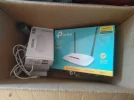
Got this off a local firm but it seems like a way over complicated way to do what I want and it involves running an internet and power cable up to the gable of the house and putting one of them up there and I'm not going to do that.
I just want something that will extend the range that the WiFi router in the house has.
Send the signal another 100ft.IMG_20240211_140125.webp
 
Got this off a local firm but it seems like a way over complicated way to do what I want and it involves running an internet and power cable up to the gable of the house and putting one of them up there and I'm not going to do that.
I just want something that will extend the range that the WiFi router in the house has.
Send the signal another 100ft.View attachment 133792
Plug that receiver into that router out in the office, have it facing the house. The other white box, plug that into the router in the house and put it to a window facing the office?
 
Is the yard across the road? Are you getting power to the office from the house?
If so you could use the electricity cable to get the signal over
 
Plug that receiver into that router out in the office, have it facing the house. The other white box, plug that into the router in the house and put it to a window facing the office?
I can't put the one in the house next to a window because the router is nowhere near a window facing the office.and I'd have a pile of arsing around with cables and it would look shite too
 
Back
Top